
Shared SEM access takes more than a login. Effective multi-user lab SEM management links individual accounts with clear instrument ownership, documented procedures, and a reliable booking process. Active Directory can support identity and access workflows, but it does not natively limit concurrent logon sessions.
It is easy to expect a directory connection to resolve access and accountability in one step. In practice, reliable governance starts by defining who approves access, who maintains the instrument, and how users follow consistent procedures while accommodating different research workflows.
This guide explains how to assign ownership across teams and facilities, connect SEM access with Active Directory, and reduce security and accountability risks. It also covers practical operating standards and scheduling, helping your lab coordinate use without losing sight of maintenance, workflow continuity, or individual responsibility.
Key Takeaways
- Assign distinct ownership for instrument access, maintenance, and workflow standards across laboratories, departments, and projects.
- Use individual accounts to support accountability; Active Directory alone doesn’t limit concurrent logon sessions.
- Set scheduling rules that balance reserved instrument time with the coordination needed for iterative or changing workflows.
- Define training and authorization around documented operating procedures, so users understand both instrument practices and their responsibilities.
Ownership across laboratories, departments, projects, and facilities
For multi-user lab SEM management, assign an accountable owner for instrument access, maintenance, inventory, and data practices. This gives a shared laboratory clear responsibility across departments, projects, and facilities.
Cross-Laboratory Ownership and Resource Management
Cross-laboratory ownership is the documented division of authority for SEM resources across teams and locations. Maintain an inventory that connects each instrument and accessory to its home facility, responsible group, service history, and current status. Compare facility-management software by its access controls, booking functions, inventory records, and maintenance logs. A custom workflow should show who approves users and who updates each record. Virtual or remote laboratory access can extend coordination, but it cannot replace on-site sample handling or instrument oversight. 3D scanning can represent equipment layout and clearances for planning; it doesn’t establish operating condition.
Shared SEM Safety and Uptime
Protect users and keep the SEM ready for work with clear safety, cleaning, and maintenance practices. Ensuring physical ergonomics is also vital during long hours at the control console, where adjustable workstations from EKOBOR Office Ergonomic Furniture help accommodate diverse team members comfortably. Before loading a sample, record its materials, preparation and cleaning steps, mounting method, and any facility-specific restrictions. Keep the procedure at the instrument, and log cleaning or faults after each session. Assign an owner to coordinate maintenance and schedule preventative maintenance visits. If a workflow uses EDS, document care and operation of the EDS system alongside SEM procedures.
SEM Fees, Staffing, and Instrument Scheduling
Set clear rules for fees, staffing, and scheduling to allocate instrument time and recover facility expenses. Calculate user fees from operating costs, including staff time, maintenance, consumables, and instrument use, then set recharge rates using the facility’s chosen allocation method. Account for the support needed for training, sample preparation, operation, and maintenance. Use booking software to record reservations, cancellations, no-shows, and actual use; define when unused slots can be reassigned. Store SEM data in access-controlled project folders, and document who may retrieve, retain, share, or publish files. Set data ownership at project intake, before image acquisition begins.
Security and user accountability risks
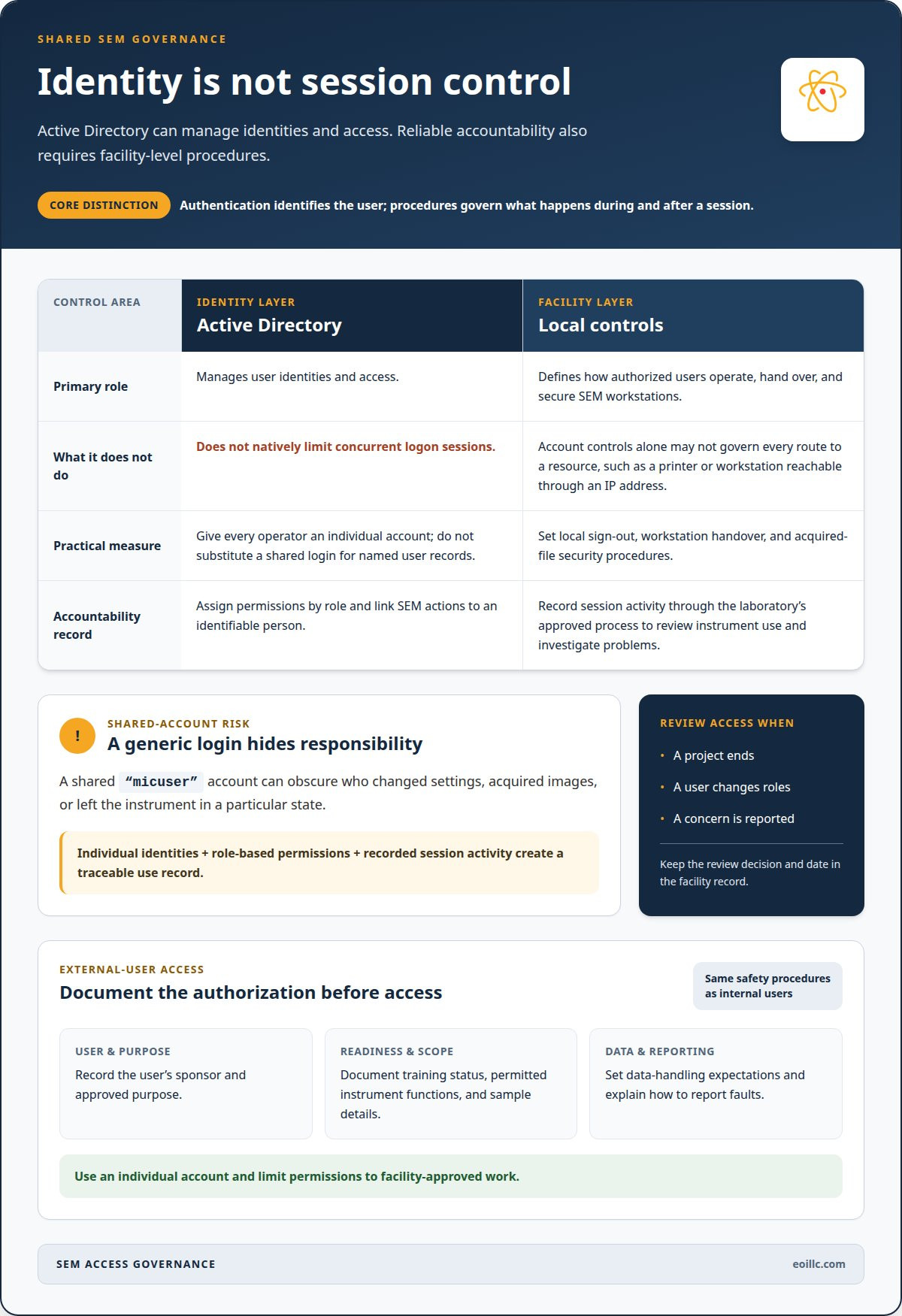
User accountability means being able to link each SEM action to an identifiable person with an authorized role. A shared “micuser” account obscures who changed settings, acquired images, or left the instrument in a particular state. Give each operator an individual account, assign permissions by role, and record session activity through the laboratory’s approved process. This creates a traceable record for reviewing instrument use and investigating problems.
Active Directory manages user identities and access, but does not natively limit concurrent logon sessions. Treat authentication and session control as separate tasks: use individual identities for access, then establish local procedures for signing out, handing over a workstation, and securing acquired files. A shared login should not replace named user records, even when operators belong to the same project group.
A university core facility should establish external-user policies before granting SEM access. Record each user’s sponsor, approved purpose, training status, permitted instrument functions, sample details, and data-handling expectations. Apply the same access and safety procedures used for internal users, while limiting permissions to the facility-approved work. For example, give a visiting researcher an individual account and document how to report faults.
Automation can support account provisioning and booking records, but it doesn’t replace oversight of shared instruments. Review access when a project ends, a user changes roles, or a concern is reported; keep the decision and date in the facility record. If a printer or workstation can be reached through an IP address, account controls alone may not govern every route to a resource. Pair defined permissions with equipment-level procedures and routine review. For upkeep that supports reliable instrument operation, consider SEM maintenance support.
How should shared SEM instrument time be scheduled and allocated?
Allocate instrument time according to research needs and facility priorities. Build booking rules around instrument readiness, operator authorization, sample stability, and the time each workflow requires. A time-sensitive sample may need prompt imaging, while exploratory work may require repeated adjustments. Account for these different needs instead of forcing every project into identical appointment blocks.
A reservation is a set period when an approved user has priority to operate the SEM. Ask users to describe the work, expected duration, sample requirements, and whether operator assistance is needed. Use this information to assign suitable blocks and identify preparation or setup needs before the session. Scheduling platforms can organize reservations, but may coexist with informal coordination, so treat the official calendar as the record of priority.
A release rule explains how unused time returns to the facility calendar. Set a clear cancellation deadline, then offer released time to users with compatible samples and authorization. Track late starts, overruns, cancellations, and no-shows so facility managers can adjust booking practices based on actual patterns. Making use of idle time can improve access, provided the next user can take over safely without affecting instrument readiness.
A scheduling buffer is time set aside for transitions between users or tasks. Include preparation, instrument checks, data transfer, and cleanup when estimating a booking rather than allocating every available period to imaging. For example, a session involving repeated adjustments may need a longer continuous block than routine imaging. Fixed, short appointments can fragment workflows and encourage users to batch experiments or rush parameter exploration.
An extension is an agreed continuation when work runs beyond its reservation. Define how users request one, how the next booking is protected, and when an operator must intervene. Pair this rule with a procedure for idle time: users may agree to an extension or use an open period, but record every change in the calendar. This keeps scheduling flexible while maintaining a dependable sequence for shared SEM work.
What training and certification are required to use a shared SEM?
Instrument-specific training teaches users to operate a particular SEM and follow the laboratory’s procedures. Before granting independent access, cover sample loading, vacuum-system practices, imaging controls, shutdown, contamination prevention, and fault reporting. Use the instrument’s operating procedures to define each task, as controls and workflows vary between SEM systems. A user who prepares samples may need different authorization from an operator who changes imaging settings.
Facility authorization is documented approval to perform defined tasks without direct supervision. Create a training record for each person that lists the instrument, procedures covered, trainer, and approved access level. Assess practical competence through observed tasks, such as preparing a sample holder, loading a sample, and ending a session correctly. Record retraining when procedures change or an operator’s work reveals a gap.
Certification is a facility-issued record that a user has met the facility’s specified training and assessment criteria. Set those criteria locally; a certificate does not grant universal permission to operate every SEM. For example, approval on one instrument should not automatically authorize independent use of another. Keep access permissions aligned with training records, and explain how users can request approval for additional functions or assisted operation.
Refresher training is a review that restores familiarity with procedures after a change or identified performance gap. Use a documented trigger, such as revised sample-handling steps, a control update, or a reported operating error. Include external researchers in the same authorization process, with a facility contact responsible for recording their permitted activities. To build a structured operator-training program, arrange SEM training support suited to your laboratory’s workflows.
Shared laboratory systems can support knowledge transfer, interaction across teams, and informal training. Shared equipment can improve utilization, reduce redundant capital purchases, and expand access to instruments. Shared infrastructure can also shape the workflows researchers choose to pursue.
Scheduling shared laboratory access can fragment workflows that need continuity. Maintenance, stabilization requirements, and readiness issues in shared vacuum infrastructure can complicate coordination across instruments. Standard operating procedures can improve reproducibility, but may also limit workflow flexibility.
Electron Optics Instruments: Cube II Benchtop SEM
Electron Optics Instruments offers the Cube II Benchtop SEM for laboratories evaluating SEM equipment for shared research or industrial workflows. Start with the work the instrument needs to support: sample types, imaging requirements, user experience, available space, and plans for managing access. These criteria help teams assess equipment alongside operating procedures, training, and maintenance planning.
The Cube II Benchtop SEM is one option in a range that also includes the Genesis Tabletop SEM, Veritas Series SEM, and Veritas Plus SEM. Compare each instrument with your laboratory’s intended applications to align equipment selection with facility needs. Scheduling and user governance matter, but they cannot replace choosing an instrument suited to the work.
Contact Electron Optics Instruments to discuss SEM equipment for your laboratory.
Build a Governance Model That Can Evolve
A shared SEM program should evolve alongside the research it supports. As projects change, review whether the instrument’s role, operating model, and access structure still meet the laboratory’s scientific priorities. Regular review can reveal where workflows need clearer boundaries, user capabilities are expanding, or instrument requirements are shifting.
Make this review part of routine facility planning instead of waiting for a scheduling conflict or equipment issue to expose a gap. Effective multi-user lab SEM management is not a static set of rules; it is an operational foundation that adapts while supporting consistent decisions. Regular review helps align instrument investment with the work teams need to accomplish.
For laboratories evaluating SEM equipment as part of that planning, contact Electron Optics Instruments to discuss your requirements. Use the next planning cycle to turn shared access into a durable research capability.
Frequently Asked Questions
What does multi-user lab SEM management involve?
Multi-user lab SEM management coordinates people, instrument access, workflows, and records to keep shared SEM work organized. Before the first session, a facility can map each project to its authorized operators, required imaging tasks, and data destination. A change log for instrument settings or procedures helps distinguish approved adjustments from accidental changes and supports consistent interpretation of results across teams.
What safety risks and operating rules apply to multi-user SEM labs?
Key risks include unauthorized operation, sample-related contamination, and failure to report instrument abnormalities. Require users to follow current procedures, avoid changing settings beyond their authorization, and stop work if equipment behaves unexpectedly. For example, a user who notices an unusual sound or error message should secure the session and alert the designated facility contact, rather than attempting an unapproved adjustment.
What staffing and maintenance costs are typical for a shared SEM facility?
Costs include staff time for training, sample preparation, operation, and maintenance, as well as maintenance, consumables, and instrument use. The facility sets recharge rates using its chosen allocation method.