

A report is useful when it turns campaign data into a decision. A search engine marketing (SEM) report evaluates paid campaigns and their effect on website traffic using measures such as clicks, impressions, click-through rate, cost per click, and conversions. A sem analysis report template gives these measures a consistent structure, making it easier to compare performance and identify what needs attention.
More metrics do not automatically make a report more complete. Clarity comes from choosing relevant measures, linking them to objectives, and explaining what the results mean for the next decision.
This article explains what an SEM report should contain, how a template can improve consistency and business insight, and which common reporting mistakes can obscure performance. It also provides a practical framework for organizing results around what happened, why it happened, and what to do next.
Key Takeaways
- Bring paid-search data into a consistent view so you can assess campaign performance against business objectives.
- Keep executive summaries focused: prioritize 5-7 KPIs, explain them in plain language, and identify the main performance drivers.
- Structure the report around what happened, why it happened, and what action should follow.
- Track relevant outcomes alongside campaign metrics, then segment results by channel, time, campaign, audience, and content.
- Use recurring report sections to spot performance changes, prioritize audits, and turn findings into clear next steps.
Why are SEM report templates important for your business?
In paid search, SEM means search engine marketing: advertising that places a business in search results. An SEM report measures campaign activity and evaluates changes in website traffic from paid advertisements. A sem analysis report template sets consistent fields for results, comparisons, and decisions. This structure helps teams assess whether clicks and conversions support business objectives, rather than relying on isolated platform totals.
Yes. You can create a free SEM reporting template in Google Sheets or Microsoft Excel by arranging campaign data in tables and charts. Choose Google Sheets for a shared, collaborative report, or Excel for spreadsheet-based analysis and formatting.
SEM reports can consolidate information from Google Ads, Bing Ads, and SEMrush. Advertising platforms show campaign delivery and outcomes, while SEMrush can help organize search and competitor research. Identify each source in the report so readers can trace results to the originating platform and compare like with like.
- Google Ads: Use it to review paid-search campaign results, including clicks, impressions, and conversions.
- Bing Ads: Use it to assess campaign performance on Bing and compare channel contributions.
- SEMrush: Use it to bring search research into campaign planning and analysis.
Choose measures that connect activity to outcomes. Click-through rate (CTR) relates clicks to impressions; cost per click (CPC) tracks average click cost; conversions show completed actions. A high click count alone, for example, does not show whether a campaign generated valuable actions. Place relevant measures together in the template, compare them with objectives, and record what changed during the reporting period.
The word “construct” has a separate meaning in structural equation modeling, another field abbreviated SEM. A construct is an underlying concept, such as customer trust, that cannot be measured directly. Researchers represent it through observable indicators, such as survey answers. Define each construct before reporting results: name the concept, list its indicators, and explain how they represent it. Confirmatory factor analysis assesses whether the measurement model fits observed data.
This distinction matters when readers encounter SEM reports across disciplines. A paid-search report tracks advertising performance; a structural equation modeling report evaluates relationships between measured indicators and theoretical constructs. For the first, identify channels, campaigns, and business outcomes. For the second, define constructs and explain the measurement model. State which meaning applies, name the data sources, and use terms consistently throughout the template.
In structural equation modeling, outliers in the data can affect model significance and distort results. Keep this consideration visible alongside the findings so readers can interpret significance in the context of the data and model setup. Recording how unusual observations were handled also makes the analysis easier to review.
Structural paths are directional arrows connecting constructs, and the model may be recursive or non-recursive. Recording these choices consistently helps readers follow how constructs relate and understand which model structure the results describe. This gives them a clearer basis for reviewing the model and interpreting its reported relationships.
Reporting mistakes and best practices
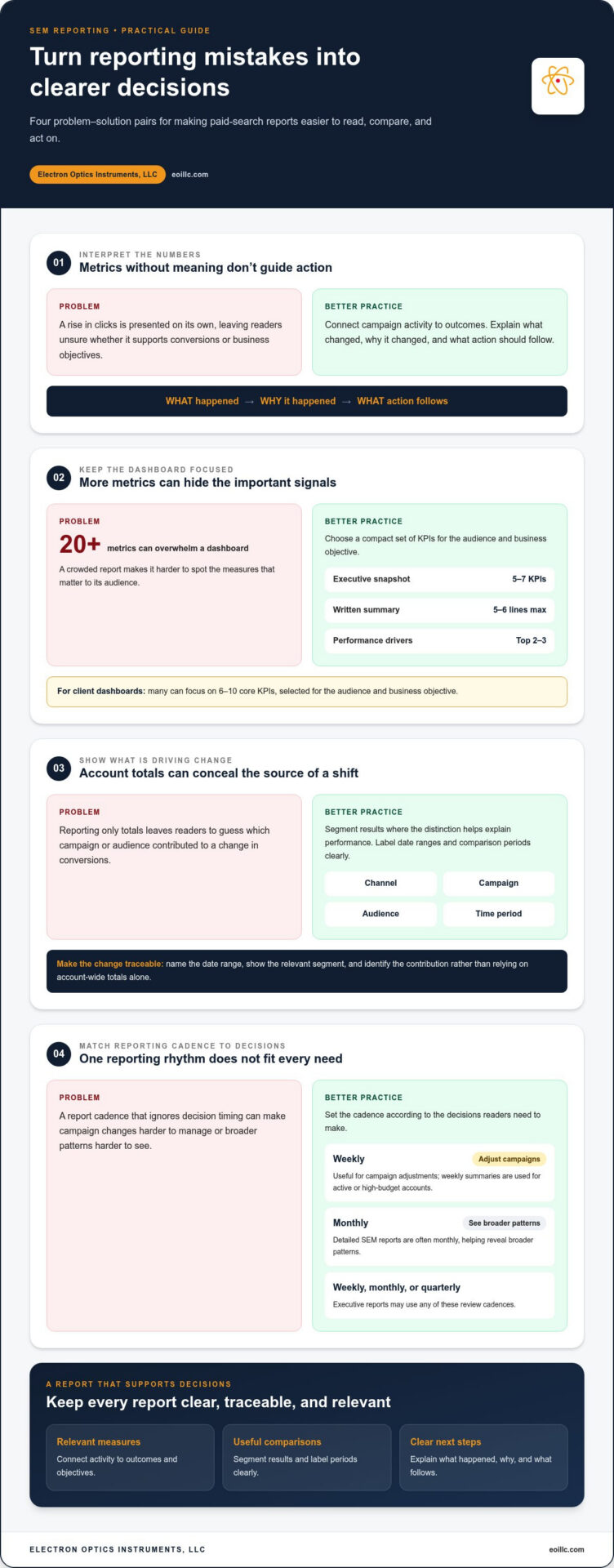
Detailed SEM reports are often sent monthly, with weekly summaries for active or high-budget accounts. Executive reports may be reviewed weekly, monthly, or quarterly. Set the cadence according to decision needs: weekly updates support campaign adjustments, while monthly reviews reveal broader patterns.
A common mistake is presenting metrics without interpretation. A rise in clicks matters only when readers can see how it relates to conversions, objectives, or campaign changes. Organize each report around three questions: what happened, why it happened, and what action follows. This sequence turns platform data into a practical decision record.
Too many measures can obscure important signals. A dashboard with 20 or more metrics is a common reporting mistake. For executive summaries, use a one-page dashboard with no more than 5-7 KPIs and a written summary of no more than 5-6 lines. Highlight the top 2-3 performance drivers. Most client dashboards can focus on 6-10 core KPIs, selected for the audience and business objective.
- Google Ads: Use campaign views to inspect delivery and performance changes before summarizing results.
- Google Sheets or Excel: Use spreadsheets to organize comparisons, document definitions, and prepare concise tables.
- Looker Studio: Use dashboards to present selected measures visually for recurring reviews.
Another mistake is reporting totals without useful segmentation. Compare performance by channel, campaign, audience, or time period when those distinctions help explain a change. Label date ranges and comparison periods clearly. If one campaign accounts for a shift in conversions, show its contribution instead of leaving readers to infer it from an account-wide total.
Structural equation modeling reports require a different form of precision. The commonly reported fit set includes chi-square, CFI, TLI, RMSEA, and SRMR. Report the RMSEA 90% confidence interval, not only its point estimate. In APA-style reporting, write bounded fit indices without a leading zero: use .97, not 0.97. Consistent formatting makes model results easier to review and compare.
For executive audiences, explain technical terms plainly and connect results to business outcomes. Include retention, expansion, and LTV by customer cohort when these measures serve the report’s purpose. A cohort view, for example, can show whether customers acquired through a campaign continue to contribute value. Keep definitions stable between reporting periods so a changed label does not conceal a changed calculation.
Before sharing, compare the report with its objectives, check labels and date ranges, and explain each highlighted change. Google Sheets supports collaborative review, while Excel can help structure detailed calculations. Use either tool to preserve definitions and comparison logic across reporting cycles.
SEM report template benefits
A reusable report structure makes campaign reviews comparable across periods. When monthly reports use the same fields, a manager can distinguish a real performance change from a change in presentation. Keeping campaign names and conversion definitions consistent, for example, helps a team compare Google Ads results without rebuilding the analysis each time.
Templates also connect performance to objectives. Place an objective beside its relevant measure, then record whether results moved toward it. If a target is missed, capture the next step, such as auditing search terms or reviewing landing-page alignment. This makes the report a working management tool, not just a record of platform activity.
This structure improves prioritization. SEM manager reports can compare current performance with objectives, while audits help identify issues and prioritize work. Give each finding a clear destination: the issue, its evidence, its business relevance, and the action assigned. If clicks remain steady but conversions change, for example, the team can investigate the conversion path instead of making an unfocused account-wide adjustment.
- Google Sheets: Use shared tables to document recurring review notes, definitions, and assigned actions.
- Microsoft Excel: Use worksheets to organize source data and compare campaign or period-level results.
- Looker Studio: Use dashboard views to present selected measures and trends for stakeholder reviews.
A template also makes responsibilities visible. Add fields for the reporting period, data source, analyst interpretation, action owner, and follow-up status. If an audit flags a campaign issue, the owner and next review point stay attached to the finding. This reduces the chance that an important observation disappears between a meeting and the next report.
Standardized definitions protect decision quality. If one report uses “conversion” for a form submission and another uses it for a phone call, comparisons can mislead. Record the event definition beside the measure and preserve it across reporting periods. When tracking changes, note them explicitly so readers can distinguish measurement changes from campaign performance.
Finally, a well-designed template helps different audiences use the same evidence. An analyst may need campaign-level detail, while an executive needs the implication and recommended action. Keep supporting detail in a separate tab or dashboard view, and summarize the decision in the main report. Google Sheets, Excel, and Looker Studio can each support this layered format, depending on whether collaboration, calculations, or visual presentation matters most.
What sections should an SEM analysis report template include?
A useful report follows a decision path, not a data dump. Organize it to explain what happened, why it happened, and what to do next. This sequence presents the outcome first for executives, while giving analysts room to show the supporting evidence.
- Reporting scope: State the date range, channels, campaigns, and business objective. Name the data sources, such as Google Ads, and note any tracking changes that affect comparisons.
- Executive summary: Lead with the main result, its business implication, and the recommended action. Keep this section concise, so readers can understand the outcome without opening detailed tables.
- Objective and results: Show the campaign goal beside its relevant outcome. Include ROI, conversions, conversion rate, and assisted conversions where they fit the objective. Explain what each result means, not just its value.
- Traffic and delivery: Report impressions, clicks, CTR, and campaign reach. Add page ranking and domain authority when search visibility provides useful context alongside paid activity.
- Cost and return: Include CPC, CPM, CPA, and ROAS. Display each beside its relevant campaign or channel, so readers can see how investment relates to results.
- Customer economics: For executive reporting, connect SEM-acquired customers with CAC, LTV, payback, and ARPU. Add retention and expansion by customer cohort when these outcomes inform business decisions.
- Analysis and next actions: Identify the performance drivers, explain relevant changes, and assign follow-up work. Record the action owner and status so findings remain traceable in the next review.
Not every report needs every measure. Select fields according to the objective, audience, and campaign structure. A lead-generation report, for example, may emphasize qualified conversions and CPA. A growth report may also need customer acquisition cost, lifetime value, and payback. Put less relevant measures in supporting detail rather than crowding the main view.
Tools support different parts of the reporting process. Google Ads provides campaign delivery and conversion data. Google Analytics can help examine website activity after ad visits. Google Sheets and Microsoft Excel work well for structured tables, calculations, and annotations. Looker Studio can present selected results in a dashboard. SEMrush can add search research context, which should be distinguished from paid-campaign results.
Build the template with repeatable labels and definitions. Use consistent campaign names, reporting periods, and conversion terminology each cycle. Put the summary before detailed tables and finish with actions. This format helps readers move from result to explanation without mistaking activity metrics for business outcomes.
What SEM performance metrics should a report track?
Choose metrics that connect paid-search activity with business outcomes. A report can include clicks, impressions, click-through rate (CTR), cost per click (CPC), cost per thousand impressions (CPM), cost per acquisition (CPA), return on ad spend (ROAS), conversions, conversion rate, and assisted conversions. Select measures according to campaign goals instead of treating every available metric as equally important.
- Visibility: Impressions show how often ads appeared; page ranking and domain authority add search visibility context.
- Engagement: Clicks and CTR indicate whether an ad drew visits relative to its impressions.
- Cost: CPC, CPM, and CPA describe different cost dimensions. Review them alongside the outcome each campaign seeks.
- Conversion: Conversions and conversion rate show completed actions. Assisted conversions help reveal contributions earlier in a customer journey.
- Return: ROAS and ROI connect campaign results with business value. Define the calculation consistently before comparing campaigns.
Interpret metrics together. A campaign with rising clicks but falling conversions may be attracting visits that do not lead to the intended action. Compare its CTR, conversion rate, and CPA, then examine the ad and destination page. A high CTR alone does not establish strong business performance: it measures engagement with the ad, not the final outcome.
Segment KPI results by channel, time, campaign, business, audience, and content. These views help isolate where performance changes occur. Channel-level results, for example, can reveal whether Google Ads and Bing Ads contribute differently. Campaign and audience segments can show which combinations produce conversions. Keep comparison periods consistent so shifts reflect performance, not mismatched reporting windows.
Choose supporting tools according to the data task. Google Ads reports paid campaign delivery and outcomes; Bing Ads provides corresponding channel data. Google Analytics can help assess website activity after ad visits. Google Sheets and Microsoft Excel support calculations and segmented comparisons, while Looker Studio displays selected measures in dashboards. SEMrush can add search research context, distinct from paid-campaign metrics.
Build a measurement sequence around the business objective. First, identify the desired action, such as a completed lead form. Next, select measures that explain visibility, engagement, cost, and conversion. Then segment results to locate changes and record the interpretation. A lead-generation report, for example, can connect impressions and clicks with conversion rate, CPA, and assisted conversions. This sequence helps readers identify whether an issue begins with ad exposure, engagement, or the conversion path.
Reports should make findings useful beyond campaign specialists. Executive SEM reports may be reviewed weekly, monthly, or quarterly, and should explain metrics for non-technical audiences. SEM reports consolidate data from sources such as Google Ads, Bing Ads, and SEMrush to monitor campaign and channel performance using KPIs such as CTR, CPC, and conversions. Clear comparisons help readers connect reported movement to the business outcome being assessed.
In structural equation modeling, observed covariance between variables should reflect a genuine relationship rather than confounding or spurious factors. Keeping this distinction in view helps readers interpret apparent associations among measures carefully.
Electron Optics Instruments: Cube II Benchtop SEM
Electron Optics Instruments, LLC offers the Cube II Benchtop SEM for work involving scanning electron microscopy rather than search engine marketing. The distinction matters: advertising metrics cannot assess whether an instrument suits the examination of materials or samples. If your work requires a benchtop scanning electron microscope, the Cube II is an equipment option to explore. Electron Optics Instruments, LLC also offers the Genesis Tabletop SEM, Veritas Series SEM, and Veritas Plus SEM. Compare the imaging tasks, sample characteristics, and workflow needs that shape your equipment decision. Contact Electron Optics Instruments, LLC for guidance on SEM equipment options.
Make Your Next SEM Decision With Clarity
Before putting a reporting process into operation, define what SEM means for your team. In marketing, a sem analysis report template organizes paid-search performance; in microscopy, SEM means scanning electron microscopy. Keeping these meanings distinct helps teams choose the right measures, tools, and equipment for their work.
If your next step involves examining materials with a scanning electron microscope, Electron Optics Instruments offers the Cube II Benchtop SEM, Genesis Tabletop SEM, and Veritas Series SEM. The appropriate instrument depends on your sample, imaging objectives, and laboratory workflow. Start by aligning those requirements with the equipment category.
Explore SEM equipment with Electron Optics Instruments and take the next step toward a reporting or imaging workflow grounded in clear objectives.
Frequently Asked Questions
What is an SEM report?
An SEM report is a structured review of search engine marketing activity and outcomes. It helps a team assess whether paid-search campaigns are meeting objectives and where performance may need attention. For example, a report might distinguish a campaign that attracts visits from one that generates completed lead forms. Because SEM can also mean scanning electron microscopy, label the report’s subject clearly when sharing it across technical teams.
What data sources and tools are needed for an SEM analysis report?
Use advertising platform data for campaign delivery and conversions, then add website analytics to understand actions after an ad click. Google Ads, Bing Ads, and Google Analytics provide complementary views; SEMrush can support search research. A spreadsheet or dashboard can organize the results. Before combining data, align date ranges and campaign names, and document each platform’s role so readers can trace a figure back to its source.
What are common SEM reporting mistakes and data quality risks?
Common risks include duplicate conversion actions, missing tracking tags, inconsistent campaign names, and comparisons across mismatched date ranges. These issues can make a reported change look like a performance shift when the measurement setup has changed. For example, check whether a form submission is counted once across connected systems. Record tracking edits, confirm that each conversion represents the intended action, and flag gaps before interpreting results.