
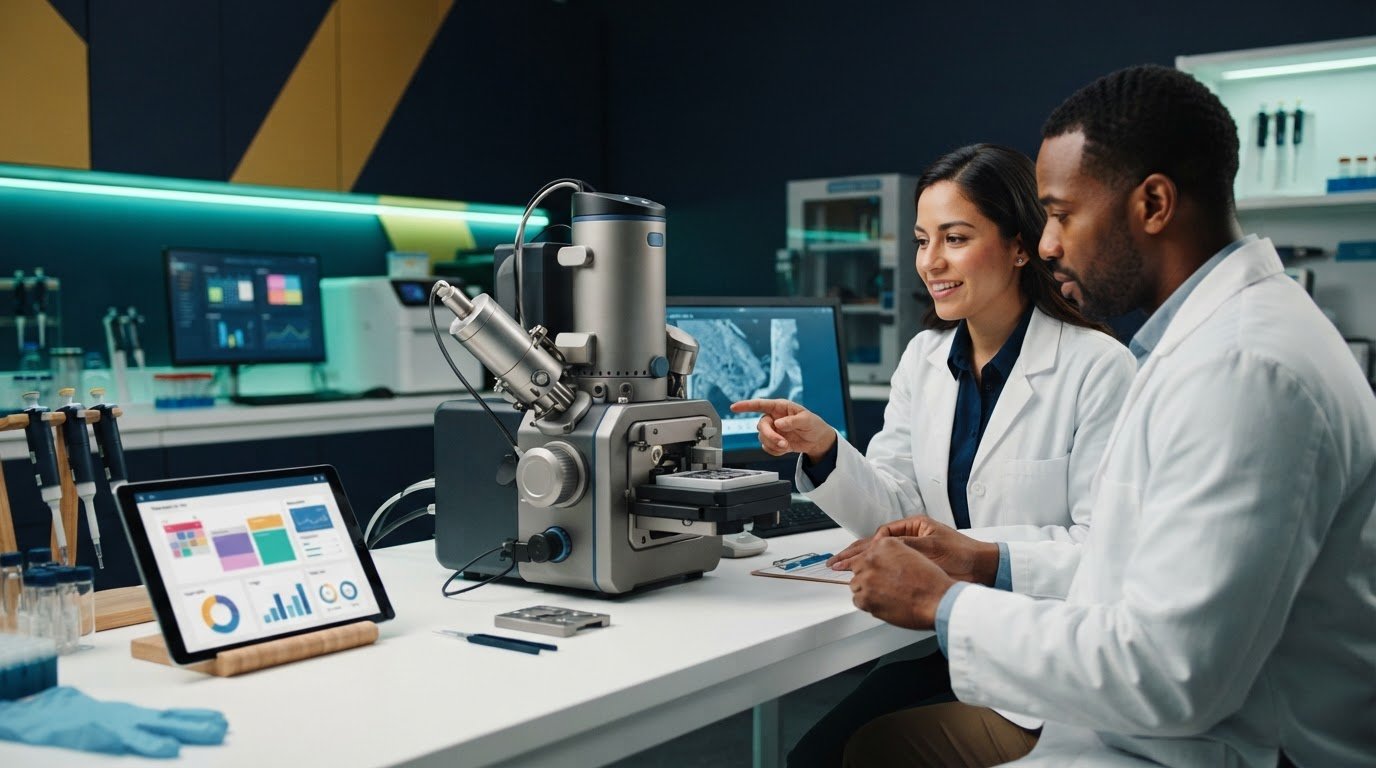
Fair access to an SEM depends on more than adding booking slots. For teams managing a benchtop SEM for core facilities, double bookings, unused reservations, and late cancellations can disrupt research and complicate cost recovery. Clear booking rules should also distinguish instrument time from staff assistance and sample preparation, so users understand what they are reserving and facility teams can allocate charges consistently.
A dependable workflow connects access rules to records of actual use. This article covers how to structure reservations, manage training and cancellations, record instrument and support time, and calculate internal charges in line with institutional policies. It also outlines measures for reviewing access, utilization, and cost recovery. Since the right process depends in part on the instrument and user-support model, equipment planning matters too. The Cube II Benchtop SEM is one option for facilities assessing shared access, training, and ongoing technical support.
Key Takeaways
- Connect reservations, usage records, and charge allocation in one workflow to make shared SEM access easier to plan and review.
- Capture the user, project, instrument, session purpose, and requested duration, then review the record after each session.
- Compare instrument-time, staff-assisted, and project-based billing to identify what fits facility operations and institutional policies.
- Set clear eligibility, training, cancellation, and no-show rules, then review access and utilization to see whether policies are working equitably.
- Plan benchtop SEM for core facilities around projected demand, sample needs, staffing, user training, maintenance, and technical support.
Benchtop SEM Scheduling and Billing: Why Core Facilities Need a Clear Workflow
A shared scanning electron microscope creates two connected responsibilities: managing who can use the instrument and recording how that use is allocated. For a benchtop SEM for core facilities, a clear workflow links the reservation, the completed session, and the charge assigned to a user, department, or project. This makes access easier to plan and charges easier to explain, while helping staff understand demand and available capacity.
A core-facility SEM usage policy defines who may reserve the instrument, what counts as usage, how sessions are recorded, and how charges are allocated. Consistent rules support equitable access without assuming that every user or session requires the same time or staff support. They also distinguish facility operations from equipment ownership and service. A booking policy governs access to a shared instrument, while the instrument’s operating and support model helps determine how that access is managed.
Because SEM workflows depend on the instrument and each user’s training, policies should reflect how sessions actually run. For an introduction to the instrument, see this overview of the Scanning Electron Microscope (SEM).
What does SEM usage include in a core facility?
Define session boundaries before setting charges. A reserved time block may differ from hands-on image acquisition, so a facility may record both separately when its policy requires it. Specify whether setup, calibration, sample exchange, and shutdown count toward billable use. Use consistent terms for independent operation and staff-assisted sessions. These distinctions help researchers understand what they are reserving and give staff a shared basis for recording use.
Why align bookings with billing rules?
A reservation records intended use; a completed-session record shows what happened. Linking the two lets staff document changes in duration, assistance, or session status, making charges easier to trace and utilization reports more useful. If setup time is counted for one user but omitted for another, or a reservation’s end time is unclear, disputes can follow and reported availability may not match actual use.
Set a consistent process for recording session start and end times, assistance, cancellations, and exceptions. After each session, compare the usage record with the reservation and resolve differences, such as an early finish or an extended session. This supports realistic capacity planning by showing where scheduled time differs from instrument use. For practical operating context that can inform session definitions, consult the SEM operation guide.
How to Build an SEM Booking and Usage-Recording Workflow
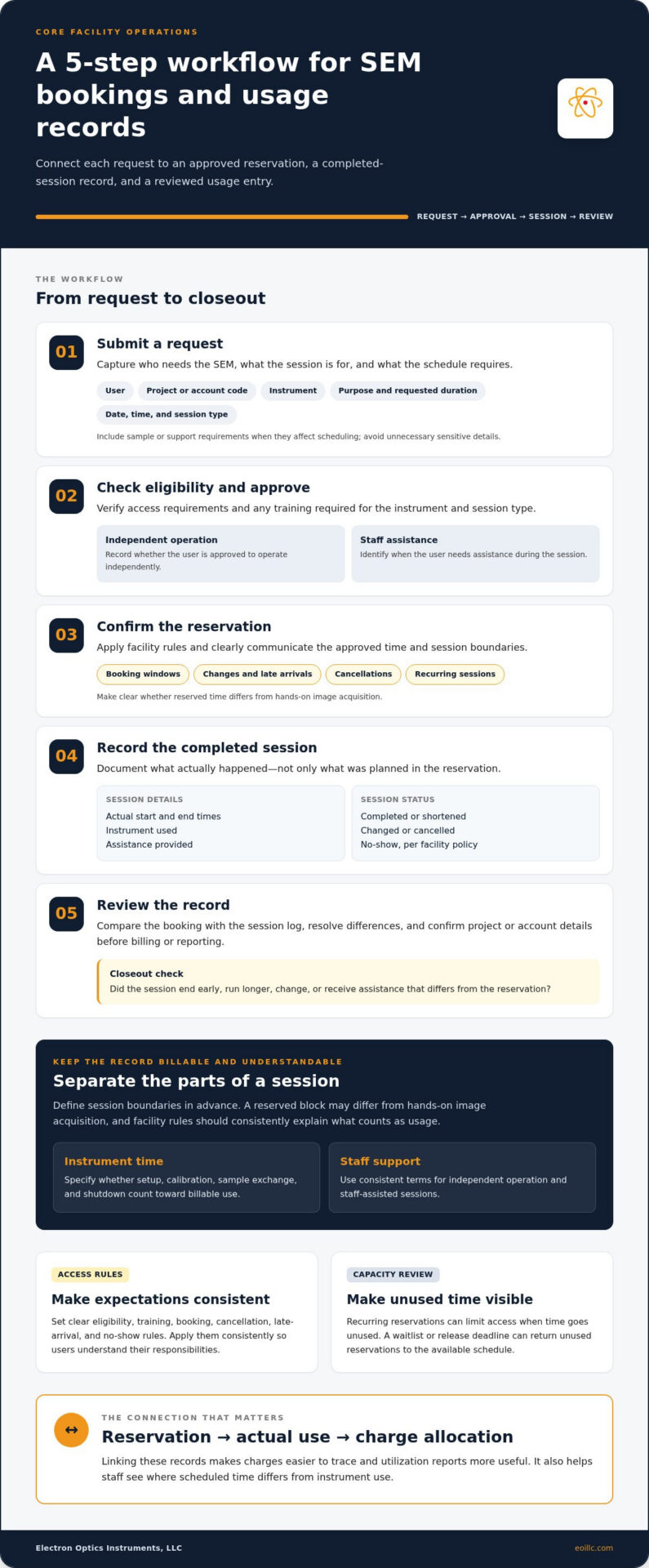
A reliable booking process connects a user’s request to an approved reservation and a complete session record. For a benchtop SEM for core facilities, that connection helps staff manage capacity and ensures usage data can support billing and review. The facility can use the scheduling and recordkeeping tools that suit its operations. The essential requirement is a consistent record from request through closeout.
- Submit a request. Capture the user, project or account code, instrument, session purpose, requested date and time, requested duration, and session type, such as independent operation or staff assistance. Include sample or support requirements that affect scheduling, but avoid collecting sensitive details that aren’t needed to plan the session.
- Check eligibility and approve. Confirm that the user meets facility access rules and has completed any required training for the instrument and session type. Record permission status so staff can distinguish users approved for independent operation from users who need assistance.
- Confirm the reservation. Apply local rules for booking windows, changes, late arrivals, cancellations, and recurring sessions. Show the approved time and session boundaries to the user, including any difference between reserved time and hands-on acquisition.
- Record the completed session. Log actual start and end times, the instrument used, assistance provided, and whether the session was completed, shortened, changed, or cancelled. If a user doesn’t arrive, record the no-show according to facility policy rather than treating the reservation as completed usage.
- Review the record. Compare the booking with the session log, resolve discrepancies, and confirm that project or account details are complete before sending the usage record for billing or reporting.
What information should an SEM reservation capture?
Keep required fields focused on scheduling and allocation: user, project or account code, instrument, requested slot, purpose, duration, and session type. Add sample or support information only when it affects readiness, staffing, or slot length. Clear rules for reservation changes, late arrival, and cancellation help users understand their responsibilities and prevent inconsistent treatment of similar cases.
How should facilities manage recurring bookings and access?
Set booking windows and limits for recurring reservations based on demand and instrument capacity. A recurring slot can support ongoing work, but unused reserved time can limit access for other projects. Use a waitlist or release deadline to return unused reservations to the available schedule. Review booking patterns regularly and adjust limits transparently, while maintaining training requirements and other access controls.
Make the workflow reflect the instrument and its support model. For example, training status can determine whether a user books independent or staff-assisted time. Applying the same fields and closeout steps across sessions creates a dependable operational record without treating every session as identical.
Compare SEM Billing Models for Core Facilities
A billing model should match the work being recorded, not just the structure of the booking calendar. For a benchtop SEM for core facilities, three approaches are common: allocate charges by instrument time, record staff assistance separately, or assign shared costs to a project. A facility may use one approach or combine them, provided its definitions and accounting treatment align with local policy.
| Model | Basis | Administrative needs | Strengths | Limitations |
|---|---|---|---|---|
| Instrument-time billing | Recorded time using or reserving the instrument, as defined by facility policy | Consistent start and end records; clear session boundaries | Connects charges to instrument access and supports utilization review | Can misrepresent effort if setup, downtime, or assistance is treated inconsistently |
| Staff-assisted session billing | Documented staff time supporting an SEM session | Separate records of assistance, preparation, or other defined staff work | Makes operator support visible rather than folding it into instrument use | Requires staff time to be recorded consistently and distinguished from instrument time |
| Project-based allocation | Costs assigned to a project or account under facility rules | Accurate project identifiers and a documented allocation method | Can consolidate usage across sessions for project-level tracking | May obscure session-level patterns unless linked records are retained |
Instrument usage charges account for access to or use of the SEM; staff-service charges account for documented personnel support. Keeping these categories distinct helps users understand each charge and allows facility teams to review instrument demand separately from staff workload.
Should SEM billing use instrument time or staff time?
Elapsed instrument time may be clearer than active imaging time when a reserved session occupies the instrument during setup, calibration, sample exchange, and shutdown. Active acquisition alone may not capture the full period when others cannot use the system. If policy permits, record staff assistance separately. Define whether minimum session units, rounding, preparation, downtime, training, or consumables are chargeable, and apply those rules consistently.
How can chargeback records support transparent cost recovery?
For each completed session, connect the actual usage record to the relevant user, project, or departmental account. Keep planned reservations distinct from completed use, and record cancellations or no-shows according to policy rather than treating them as instrument usage. This makes charges traceable and supports cost-recovery reviews based on verified records. For equipment-budget context, rather than user-fee benchmarks, see this electron microscope cost guide.
Before applying a model, document how it treats instrument availability, staff effort, training, setup, downtime, and consumables. The resulting framework can reflect facility operations and instrument support requirements without conflating equipment ownership with user charges.
How to Set Fair SEM Access Policies and Review Facility Performance
A single billing rule doesn’t automatically create fair access. Users may differ in training status, session requirements, and work priorities, so fairness depends on transparent access criteria as well as consistent charges. For a benchtop SEM for core facilities, document eligibility, training prerequisites, cancellation and no-show rules, and how exceptions are approved. Apply the rules consistently and explain them before users reserve instrument time.
Which policies help keep shared SEM access equitable?
Define how the facility prioritizes routine work, research deadlines, and time-sensitive operational needs. State who can authorize exceptions and how decisions are recorded. Explain how trained users book independent sessions and how users who need staff assistance access the instrument. Publish cancellation deadlines and no-show procedures in advance. Predictable rules encourage users to release time they no longer need and give others a fair opportunity to book.
Keep exceptions visible rather than handling them informally. For example, record the reason for a schedule change and whether staff assistance or instrument availability affected the session. That creates a reviewable basis for decisions without assuming every user has the same requirements.
Which metrics reveal scheduling or billing problems?
Review operational measures together. A high number of reservations alone doesn’t show whether the instrument was used effectively. Compare reserved with completed hours to identify unused capacity, and examine cancellation, no-show, overrun, and staff-assisted session patterns. Booking lead time can also show whether users need to reserve far in advance or whether available slots are being released too late for others to use.
- Reserved versus completed hours: highlights unfilled or unused blocks.
- Cancellations and no-shows: shows whether release rules need clarification.
- Overruns and assisted sessions: can indicate that slot lengths or staffing assumptions need review.
- User feedback and billing corrections: can expose unclear boundaries or inconsistent records.
Record equipment downtime separately from user cancellations and completed use. Distinguish planned maintenance from unplanned service interruptions, and note the affected period so capacity reports don’t treat unavailable instrument time as unused demand. The SEM maintenance guide provides additional context for maintenance planning.
Use these findings to refine policy, then communicate changes consistently. For facility planning that includes equipment, training, and maintenance considerations, explore SEM equipment and support options.
Choose an SEM Setup That Supports a Sustainable Core-Facility Workflow
Equipment selection shapes how a shared facility schedules access, supports users, and maintains availability. Instead of starting with booking capacity alone, translate projected demand into instrument requirements: expected sample types, user experience, throughput needs, analytical methods, staffing, and existing access rules. A benchtop SEM for core facilities should fit the work and support model the facility intends to sustain, not simply take up less space or seem easier to schedule.
How should a facility assess equipment fit for shared use?
Map the facility’s typical and less common samples, users’ experience levels, and the analytical capabilities projects require. Then consider how those needs affect session length, training, and staff involvement. If users can operate independently after training, access may be structured differently than for sessions that routinely need operator assistance. Evaluate instrument fit against the full workflow, including sample handling and staffing, rather than expecting booking software alone to resolve capacity constraints.
The Cube II Benchtop SEM is one option for facilities evaluating shared SEM access. Assess its role alongside intended applications, user onboarding, facility procedures, and the ongoing support plan. No instrument should be assumed to provide a scheduling or billing function. Aligning these elements turns equipment selection into an operational plan instead of treating procurement as separate from daily access management.
How do training and service support dependable scheduling?
Build onboarding around documented operating and sample-handling procedures, and make the relationship between training completion and independent access explicit. Training affects how many users can operate without staff assistance, while preventative maintenance and service events affect when the instrument can be booked. Include planned maintenance windows in published availability. Record service-related downtime separately from cancellations or unused reservations so utilization reviews reflect actual operating conditions.
Electron Optics Instruments provides on-site technical training, preventative maintenance, and SEM service. Facilities can incorporate these services into plans for user readiness and ongoing instrument support. These operational inputs help establish realistic access assumptions and maintain a clear connection between equipment availability and the booking workflow.
For facilities assessing how equipment and support can align with shared-use requirements, explore SEM solutions from Electron Optics Instruments.
Build a More Predictable SEM Access Model
Reliable shared access depends on more than an open calendar. Clear reservation and usage records help facilities explain charges, while documented access, cancellation, and training policies set consistent expectations for researchers. Reviewing completed use alongside cancellations, assisted sessions, and downtime can show where scheduling rules or capacity assumptions need adjustment.
For teams planning a benchtop SEM for core facilities, equipment selection should align with projected demand, sample requirements, staffing, user readiness, and ongoing maintenance. These factors shape the access a facility can realistically offer and how it can sustain instrument availability over time.
Electron Optics Instruments, LLC brings more than 30 years of industry experience and provides SEM training, preventative maintenance, and repair services. These capabilities can inform planning for an instrument and its support requirements. Explore SEM equipment, training, and service solutions as you develop a shared-use workflow for dependable access and informed facility planning.
With clear policies and an operationally aligned SEM setup, facility teams can make shared access more predictable and manageable over the long term.
Frequently Asked Questions
How should a core facility schedule shared SEM time?
Schedule shared SEM time using published booking windows, eligibility rules, and required reservation fields. Capture the user, project, instrument, session purpose, and requested duration, then record actual start and end times separately. State how users can change or cancel reservations and how late arrivals or no-shows are handled. Apply the same rules consistently, and review conflicts and unused slots against instrument capacity, training requirements, and facility policies.
What should an SEM usage fee include?
An SEM usage fee should clearly identify the activities or resources it covers. State whether charges apply to instrument time, staff assistance, sample preparation, consumables, or other defined services, and separate categories when that improves transparency. Document the billing unit, exceptions, and process for assigning charges to a user, project, or account. The appropriate structure depends on facility operations and institutional policies, so there is no universal fee model.
Should SEM users be charged for reserved time or actual usage?
Either reserved-time or actual-usage billing can work if the facility defines and communicates its approach before users book. Charging for reserved time accounts for capacity held unavailable to others, while actual-usage billing relies on accurate records of completed sessions. Specify how the policy handles early finishes, overruns, cancellations, no-shows, and staff assistance. Consistent session boundaries help users understand charges and give facility staff reliable records to review.
How can a core facility reduce SEM scheduling conflicts?
Reduce SEM scheduling conflicts by publishing eligibility and booking rules, requiring complete reservation details, and setting clear expectations for changes and cancellations. A waitlist or release deadline can make unused slots available to other users. Review booking patterns to identify recurring conflicts, late cancellations, or unused reservations, then adjust access rules based on documented demand and facility priorities. Make policy updates visible so users understand how scheduling decisions are made.
How should SEM staff assistance be billed?
Define staff assistance separately from instrument access, and specify which tasks count as support, such as help during acquisition or other facility-defined work. Record staff time consistently and link each assisted session to the relevant user, project, or account. Explain how users request assisted sessions and how those sessions are charged. Billing units and rates should follow the institution’s approved processes, not assumed industry-wide conventions or informal practices.
Which metrics should an SEM core facility track?
Track reserved and completed hours, cancellations, no-shows, session overruns, assisted sessions, and booking lead time. Review these measures alongside billing corrections and user feedback to identify unclear policies or recurring workflow issues. For example, a gap between reserved and completed hours may point to released capacity, while repeated overruns may suggest that session lengths need review. Interpret metrics together, since booking volume alone doesn’t establish efficient utilization or equitable access.
Can a benchtop SEM be used in a core facility?
Yes. A benchtop SEM can be considered for shared facility use when its capabilities, expected samples, user training, demand, and support requirements align with facility needs. The instrument’s form factor doesn’t determine how access should be scheduled or billed; those are facility-management decisions. Assess how the instrument fits the planned workflow, including independent and staff-assisted use. The Cube II Benchtop SEM is one option facilities can evaluate as part of that planning.